
Matelect Software
PDsoft v3 data-acquisition software, plus free LabVIEW drivers for every current and legacy instrument.
PDsoft v3 overview
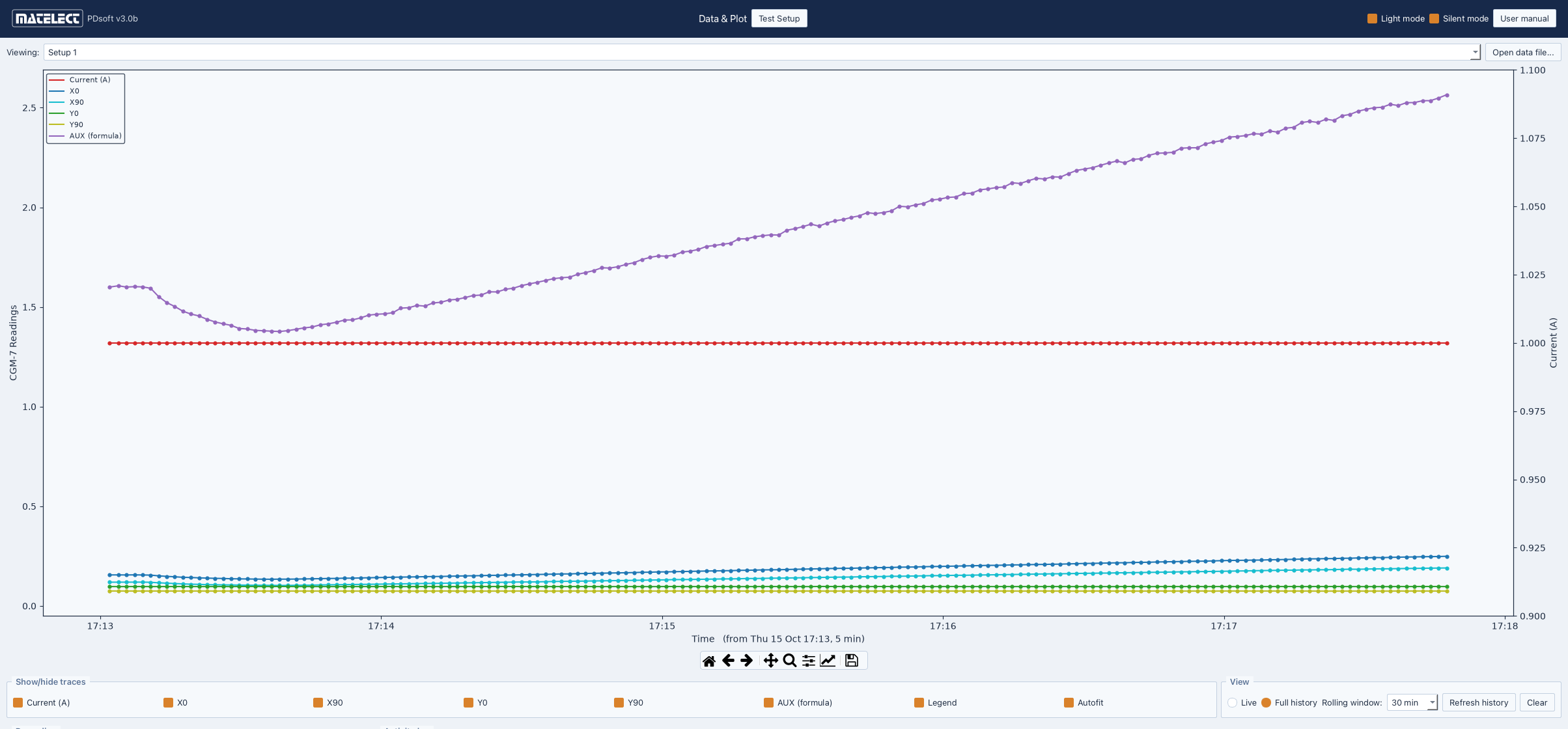
PDsoft v3 is the current release, and replaces PDsoft v2. It is a ground-up rewrite that runs on both Windows and Mac, and it carries over everything v2 did — scanner control, MCI-1 load synchronisation, automated frequency sweeps, user formulas with a real-time 'mm' output, and sequential ACPD and DCPD measurement of the same specimen.
What it adds is a different way of running a test. Each specimen gets its own Setup, with its own instrument, settings, formula and chart. Setups sharing one instrument take their turn automatically. Where v2 capped you at a fixed number of instruments, v3 does not: well over 32 Setups can record at once. Every reading is logged to CSV stamped with the settings that produced it — current, frequency, gain, filter, offsets, scanner channel — so months-long tests stay self-describing, and each session saves its own activity log alongside.
Three things in particular are worth a look: PDsoft Assistant, which watches a running test and tells you when something is wrong with it, PDsoft v3 Remote, which puts the whole test in a web browser, and the reworked DCM-2 control.
An evaluation version is on its way — in the meantime, get in touch and we will sort you out with a copy and a licence.
Superseded versions: PDsoft v2 manual (PDF) · PDsoft v2 evaluation download · PDsoft v1 manual (PDF) · PDsoft v1 update log (PDF)
Features
- Runs on Windows and Mac, with the CGM-7 and DCM-2
- No fixed channel limit: well over 32 Setups can run at once, each with its own instrument, settings, formula and chart
- All readings charted live and logged to CSV, with every setting stamped onto every row and an activity log for each session
- Full scanner control for the SM-HF and SM-HC systems, and MCI-1 load synchronisation for ACPD
- Automated frequency sweeps, and your own formulas — saved as presets — graphed and logged in real time in 'mm'
- PDsoft Assistant watches the live signal for crack closure, weak signal, lost headroom and probe faults, and marks what it finds on the chart
- Email notifications send those findings, and your own notes, to whoever needs them
- PDsoft v3 Remote: watch and control a running test from a browser on any machine or phone, with its own live and full-history charts
- Windows installer sets up the CP210x USB driver for you, with NI-DAQmx as an option
What's new in v3
The parts that change how a test is run, plus the smaller things that add up over a long one.
PDsoft Assistant
A long PD test can go wrong quietly. The specimen shorts as the crack closes, a probe works loose, the signal drifts to the edge of range — and nothing says so until you read the data back days later.
PDsoft Assistant watches the live signal for exactly those faults, on both the CGM-7 and the DCM-2, and marks what it finds on the chart as it happens. Alongside the crack-closure check it watches signal strength, headroom at the start of a test, and probe connection. Findings can be emailed to you and your colleagues as they are raised, so a test that has gone wrong overnight does not wait until morning.
PDsoft v3 Remote
Remote puts a running test in a web browser. Open it from another machine, from home, or from a phone: you get the live chart, the full logged history, the state of every Setup, and the settings themselves — including formulas and presets, which can be sent to every Setup on an instrument at once.
It is served from the PC running the test, with its own list of permitted users, so no test data leaves your network unless you want it to.
DCM-2 control
The DCM-2 comms driver has been rewritten from the ground up.
Sync mode is a single dropdown of 24 presets, setting the sync point, filter readings and filter samples together. Load Pk-Pk and Load offset are back as they were in v2, and the unit's four internal temperatures are logged alongside the readings. Several Setups can share one DCM-2, taking their turn, and sending a full set of settings to a unit that is already running now takes seconds rather than minutes. A session always leaves the unit properly stopped.
LabVIEW Drivers
Free downloads for use with National Instruments LabVIEW. Need help? Download the driver manual or contact us directly.